Path 1 — Maritime fundamentals
Navigation fundamentals
Module 1.48 minInteractive tools5-question check
Module 1.4
Navigation for non-bridge crew

Navigation is the bridge's responsibility. The Master, Officers of the Watch, and navigator manage the vessel's movement, course, and position. You are not expected to navigate.

What you are expected to understand is enough to function as an effective crew member: how positions are described and communicated, how to identify and report the location of targets relative to your vessel, and how to maintain basic awareness of where you are and what is around you. This knowledge also helps you understand operational briefings and contributes to your own safety.

What you'll cover
  • Latitude and longitude — how position is described and communicated at sea
  • The clock system — how to identify and report the position of targets relative to the vessel
  • Nautical charts — what they show and why they matter
  • AIS — the vessel tracking system you'll see used aboard
Estimated time
8 minutes — followed by a knowledge check
Section 1 of 3 — Interactive
Position at sea

At sea, position is described using latitude and longitude — a grid system covering the entire surface of the earth. You will hear positions constantly during operations: where a distress call originated, where a vessel was last spotted, where to search. Understanding what these numbers mean is essential.

Latitude

How far north or south of the equator. Runs from 0° (equator) to 90° (poles). The Central Mediterranean SAR zone sits between roughly 30°N and 38°N. Higher number = further north.

Longitude

How far east or west of the Prime Meridian (through Greenwich, London). Runs 0° to 180° East or West. The Central Mediterranean sits between roughly 10°E and 20°E.
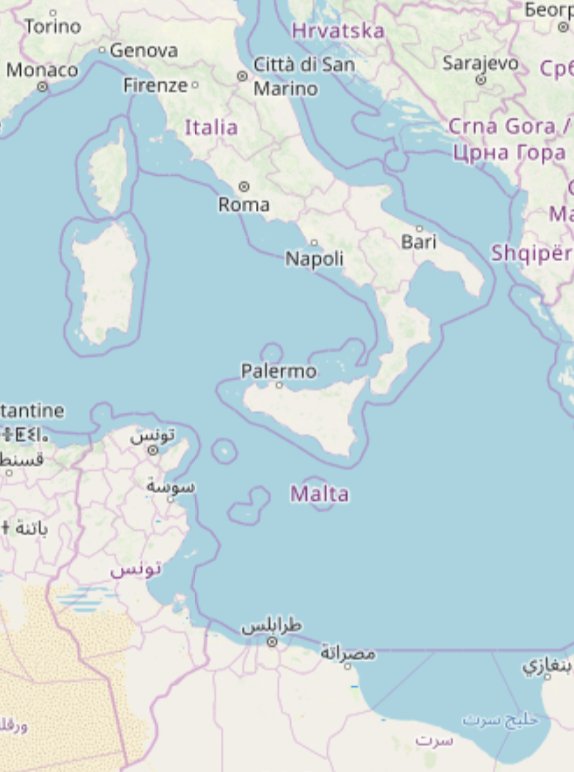
Position
35°12.0'N, 013°18.0'E
Location
Central Mediterranean
25°N — N. Africa coast45°N — N. Italy
5°E — Sardinia25°E — Greece
Central Mediterranean — Italy, Sicily, Malta, Tunisia, Libya
45°N / 5°E
45°N / 25°E
25°N / 5°E
25°N / 25°E

Drag the sliders to move the position marker across the Central Mediterranean  ·  © OpenStreetMap contributors, ODbL

How positions are written and spoken
Degrees and decimal minutes — standard in maritime VHF communications
35°12.0'N, 013°18.0'E
The format you will most commonly hear spoken on radio and in briefings. Each degree is divided into 60 minutes. Spoken as "thirty-five degrees, twelve decimal zero minutes North." Longitude always uses three digits — 013, not 13.
Decimal degrees — used by GPS and most digital tools
35.2000°N, 013.3000°E
Common in apps, phones, and digital navigation systems. Easy to copy and paste. The same position as above — just written differently.
Always read back a position — and note it down
When a position is passed by radio it should always be read back to confirm it was received correctly — and written down at the same time. A single transposed digit can place a vessel miles from its actual location. Read it back, wait for confirmation, and have the written record to refer to. Memory alone is not enough in an operation.
Section 2 of 3 — Interactive
The clock system

When identifying the position of a target — a vessel in distress, a person in the water, another ship — relative to your vessel, SAR crews often use the clock system. The vessel's bow is always 12 o'clock. Everything else is described relative to that, as if the vessel is the centre of a clock face.

This is faster and less ambiguous than compass bearings for deck crew, and it works regardless of which direction the vessel is heading. Tap the clock positions below to see what each one means.

12 3 6 9 1-2 4-5 7-8 10-11 BOW AHEAD STBD PORT ASTERN
Tap a position
12
Directly ahead — on the bow. Dead ahead of the vessel.
1–2
Forward starboard — ahead and to the right.
3
Starboard beam — directly to the right, at 90° from the bow.
4–5
After starboard quarter — behind and to the right.
6
Directly astern — directly behind the vessel.
7–8
After port quarter — behind and to the left.
9
Port beam — directly to the left, at 90° from the bow.
10–11
Forward port quarter — ahead and to the left.
Using the clock system in practice
When you spot a target — an overcrowded boat, a person in the water, another vessel — report it immediately using the clock position and an estimated distance. For example: "Target at 2 o'clock, approximately 500 metres." Always face forward (toward the bow) when using the clock system so your reference point is consistent with the bridge.
Distance estimation
With practice, you develop a feel for distances at sea. Some useful references: a person in the water is visible from roughly 500m in good conditions. An overcrowded boat can be visible from 1–2nm in good visibility but much less in poor conditions or high swell. When estimating, it's better to give a range — "between 300 and 500 metres" — than false precision.
Section 3 of 3
Charts and situational awareness

Nautical charts are the maps of the sea. Unlike road maps, they primarily show what is under the water — depth, hazards, shipping lanes, and coastal features — rather than what is above it. The bridge uses electronic chart systems (ECDIS) continuously, and paper charts are kept as backup.

You don't need to read a chart in detail, but understanding what you're looking at when you see one — during a briefing or on the bridge — helps you follow what's being discussed.

What charts show
Depth contours
Lines showing water depth in metres. Critical for vessel safety — the bridge is continuously monitoring depth. Numbers shown in blue areas indicate depth at that point.
Hazards
Rocks, wrecks, shoals, and other hazards are marked with specific symbols. Red or magenta colouring often indicates danger areas or restricted zones.
Shipping lanes
Traffic Separation Schemes (TSS) divide shipping into lanes — like motorways at sea. SAR vessels operating in or near these need to be aware of commercial traffic.
Search areas
During operations, the bridge and MRCC define search areas on charts. Understanding that a designated area has boundaries helps you understand why the vessel is moving the way it is.
AIS — Automatic Identification System

AIS is a tracking system that all vessels above a certain size are required to broadcast. It transmits the vessel's identity, position, course, speed, and destination. Aboard your vessel you will see AIS data displayed on chart plotters — showing all other AIS-equipped vessels in the area as symbols with their details.

What it shows you

Other vessels' names, positions, course, speed, and destination. Extremely useful for coordinating with nearby vessels during an operation — you can identify a passing merchant by name before calling them on VHF.

What it doesn't show

Small vessels, fishing boats, and overcrowded boats carrying migrants are typically not AIS-equipped. Persons in the water have no AIS signal. AIS is useful context — it is not a substitute for visual lookout.

MarineTraffic

MarineTraffic.com and its app show AIS data publicly. Useful for understanding what vessels are in your area before a deployment. Your own vessel will appear on it — SAR NGO vessels are often tracked by support teams onshore.

Radar

Radar detects objects regardless of whether they are transmitting AIS. The bridge uses radar continuously and it is particularly valuable at night and in poor visibility. Radar returns can reveal vessels and larger objects that have no AIS.

Your most important navigation tool
Your eyes. No technology replaces a sharp lookout. The bridge has radar, AIS, and ECDIS — but a crew member on deck looking out is still the most reliable way to spot a low-lying boat, a person in the water, or an object in the vessel's path. When you are on deck, look outward. When you spot something, report it immediately using the clock system.
Knowledge check
Before you move on

Five questions on position, the clock system, and situational awareness.